


Benchmarking AI models:
An AI benchmark covering full-stack software generation and bug fixing shows why using a single standard model for all development tasks is usually not the best approach.
AI coding tools are now mature enough to be taken seriously in software development. Not as standalone tools for a few enthusiastic developers, but as part of the entire software delivery process. That also changes the question. It is no longer: can an AI model write code? By now, virtually every model can. The better question is: which model produces usable software at an acceptable cost and within your architecture and governance frameworks?
Betabit and Fenêtre Online Solutions tested multiple models within their platform to accelerate software development in a structured way: the SiliconCode AI Software Factory. Every model received the same assignments, the same instructions, and the same technical context. We evaluated full-stack software generation, bug fixing, test output, documentation, and cost.
The key conclusion: the right combination of models wins.

Why this benchmark is needed
In a small team, developers can often decide for themselves which AI tool they prefer. That no longer works in organizations with multiple development teams. Different questions start to emerge.
Which models are teams allowed to use? Which source code can be sent to a model as context? How do you prevent every team from choosing its own AI tool stack? How do you measure whether AI actually saves time instead of simply producing more output? And how do you keep costs under control?
These questions are becoming more urgent now that AI coding is increasingly billed based on usage. GitHub has switched to usage-based billing with GitHub AI Credits. Usage is calculated based on token consumption, including input, output, and cached tokens. For organizations and enterprises, Copilot usage is measured in AI Credits, with options for budget controls. Costs can increase significantly when using more powerful models.
That makes model selection essential for IT management. An expensive model run can be perfectly justified for complex architecture or security-sensitive code. That same run is much harder to justify for standard CRUD code, documentation, or a simple bug fix.
Our test clearly demonstrated this trade-off. The highest quality did not always come with the best price-to-output ratio. At the same time, several relatively inexpensive models showed that a low run cost does not automatically come at the expense of a usable result.
What do we mean by benchmarking AI models?
Benchmarking AI models means having different models perform the same software task under identical conditions. The output is then evaluated against predefined criteria.
For business software development, "the code compiles" is not enough. You want to know:
Does the model follow the assignment?
Are all key components included?
Does the code fit the architecture?
Are database changes versionable?
Are the frontend and backend properly aligned?
Are tests included?
Is error handling implemented?
Is the output maintainable?
How much review and rework remains?
What was the cost of the run?
That final point is often underestimated. The run cost itself is only part of the story. A cheap model is not actually cheaper if developers have to spend significant time fixing its output. Conversely, a more expensive model may be the better choice if it reduces review time and lowers the risk of regression.
That is why we prefer a single practical metric: what is the cost of an accepted, tested, and maintainable change? Not the prompt. Not the number of generated lines of code. The change that actually passes review and testing and is ready to be merged.
The test environment: SiliconCode AI Software Factory
The benchmark was conducted within the SiliconCode AI Software Factory. We used the Kai & Ralph module, where a Kanban board is combined with controlled and compliant code generation.
This is important because agentic software generation only becomes truly valuable when a model operates within a controlled development pipeline instead of as a standalone chat assistant.
Within the test environment, the following were fixed:
the assignment the model had to complete
the available instructions
the minimum required technical components
how the output would be evaluated
which run cost would be recorded
which signs of instability or required rework would be identified
We were not interested in a demo where a model builds one polished component. We wanted to see what happens when a model has to work across multiple software layers simultaneously: data, backend, frontend, testing, and documentation.
This is also where real-world projects often run into problems. Models rarely fail completely. The issue is more subtle. They produce something that looks correct at first glance, but during review it turns out that a migration is missing, the tests are too limited, or the core interface is not fully functional.
Test 1: Full-stack software generation for AutoKanban
For the first benchmark, every model received the same assignment: build AutoKanban, a Kanban board application that automatically improves itself by adding new functionality.
The application had to include at least:
database migrations
authentication and login
a fully functional Kanban board interface
theme support
backend and frontend tests
a changelog
a codebase overview
Many business applications are built from the same components: users, data, workflows, screens, validation, roles, logging, and maintainability. For IT managers, AutoKanban is therefore comparable to an internal business application. It is not extremely complex, but it is realistic enough to expose the differences between models.
For AI experts, the assignment is interesting because it reveals multiple failure modes. Some models generate a large amount of code but forget database migrations. Others build backend functionality while missing the core user interface. Others deliver a working application but without meaningful tests. And, of course, there is the added challenge that the application must be capable of improving itself with new functionality.
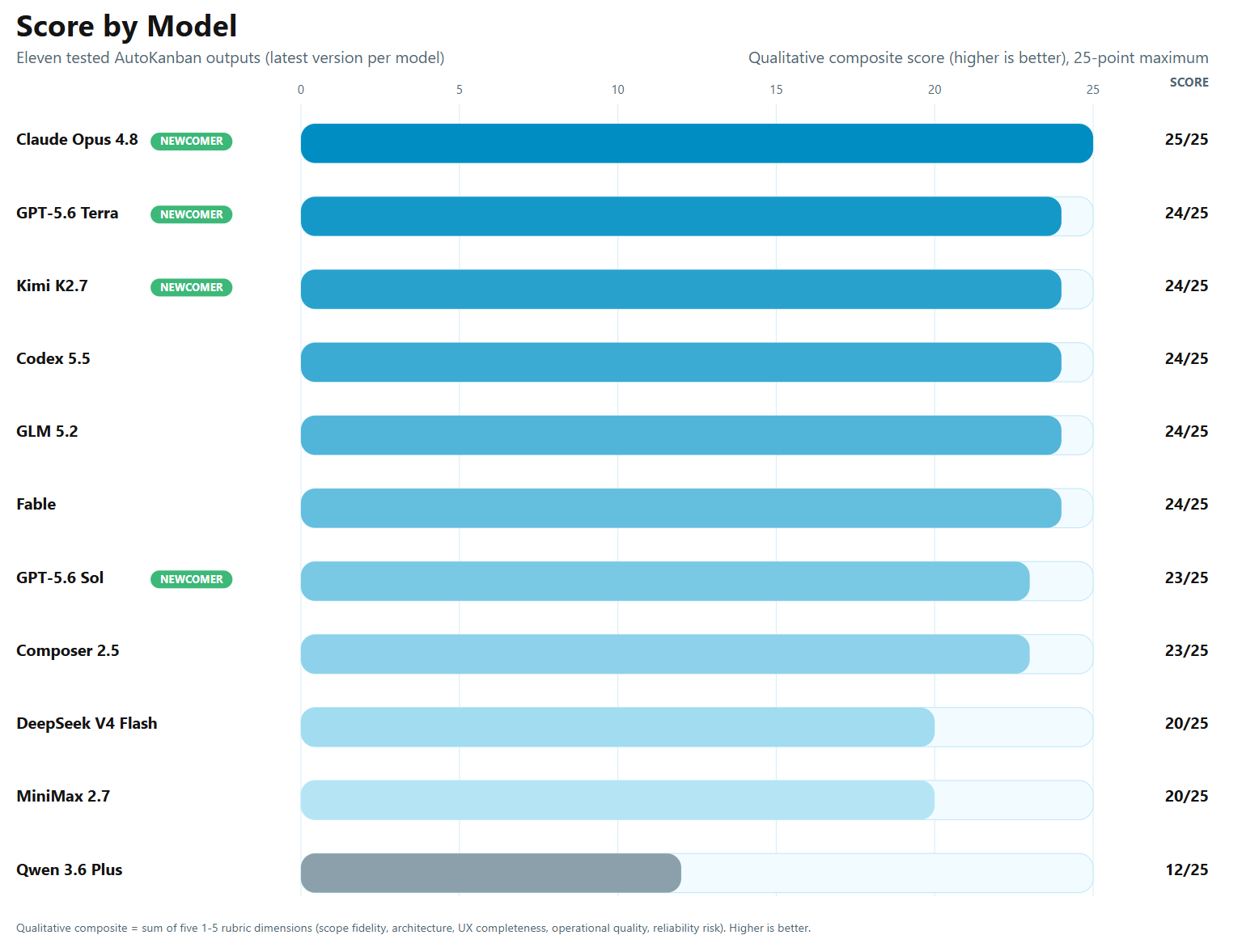
The benchmark shows that the top-performing models are very close to one another. Claude Opus 4.8 is the only model to achieve the maximum qualitative score of 25/25. GPT-5.6 Terra, Kimi K2.7, Codex 5.5, GLM 5.2, and Fable follow with 24/25. GPT-5.6 Sol and Composer 2.5 both score 23/25. DeepSeek V4 Flash and MiniMax 2.7 achieve 20/25, while Qwen 3.6 Plus clearly trails behind with 12/25. The difference therefore lies less in whether a model can build an application and more in completeness, architecture, user experience, operational quality, and reliability.
Test 2: 29 bug fixes in an existing codebase
The second benchmark focused on bug fixing. This is at least as relevant as generating new software. In many organizations, a large share of development capacity is spent on maintenance, regressions, small improvements, and fixes in existing applications.
We had 29 bugs resolved through the SiliconCode AI Factory. Each model was evaluated based on bug-fix performance and run cost. The maximum possible score was 71.5 points.
The chart highlights two key findings. First, a clear leading group emerges for bug fixing, consisting of GPT-5.6 Sol, GPT-5.6 Terra, and Fable. Second, performance and cost do not move in lockstep. A higher run cost does not automatically produce a higher score, while lower-cost models can sometimes come surprisingly close to more expensive alternatives on well-defined tasks.
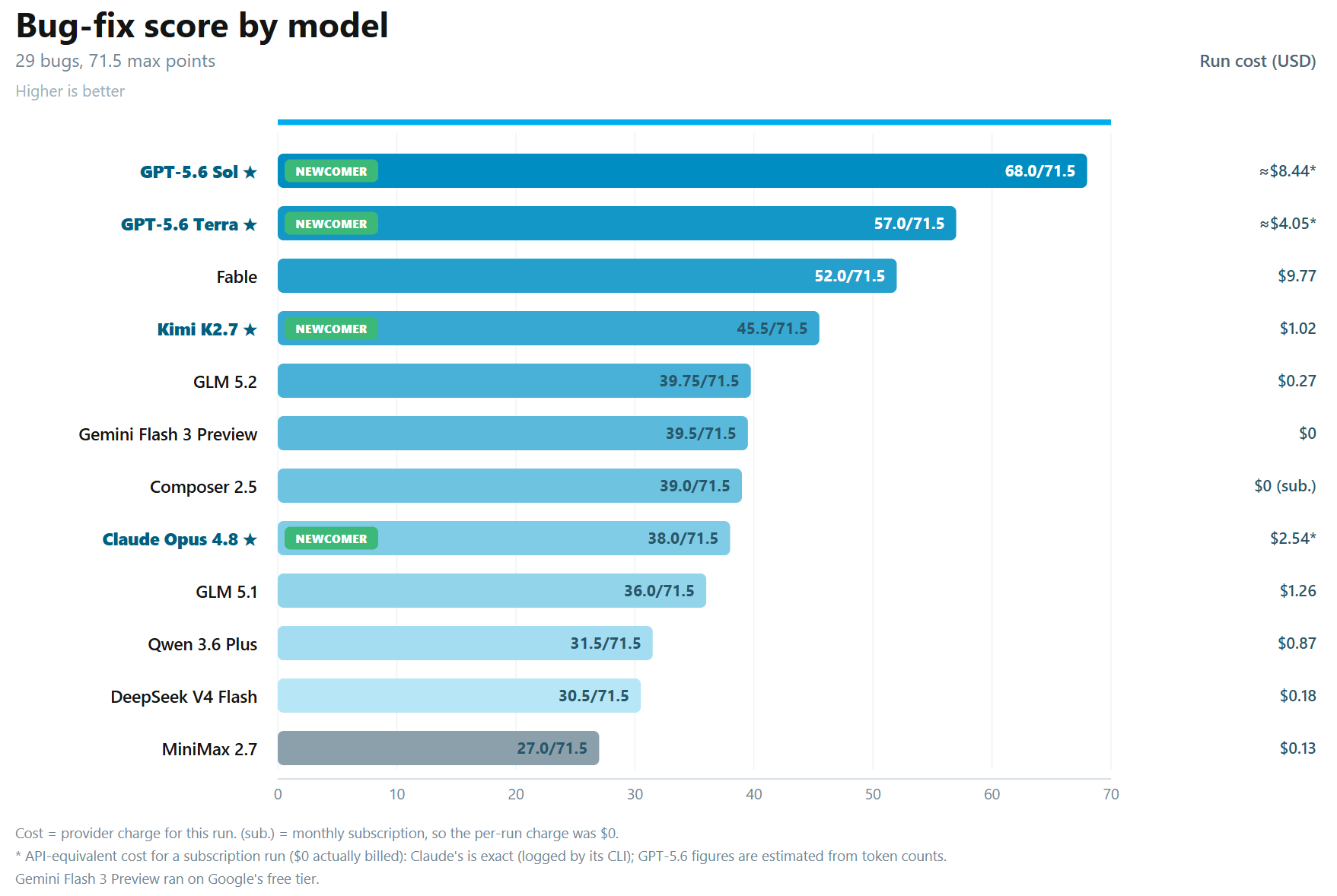
GPT-5.6 Sol achieved the highest score with 68.0/71.5. GPT-5.6 Terra followed with 57.0/71.5, while Fable scored 52.0/71.5. Kimi K2.7 reached 45.5/71.5. Behind them was a closely grouped field with GLM 5.2 at 39.75/71.5, Gemini Flash 3 Preview at 39.5/71.5, Composer 2.5 at 39.0/71.5, and Claude Opus 4.8 at 38.0/71.5.
The cost rankings paint a different picture than the performance rankings. GPT-5.6 Sol achieved the highest bug-fix score with an estimated API-equivalent run cost of approximately $8.44. GPT-5.6 Terra was estimated at $4.05, while Fable came in at $9.77. Kimi K2.7 cost approximately $1.02, Claude Opus 4.8 around $2.54, and GLM 5.2 just $0.27. Gemini Flash 3 Preview ran on a free tier, while Composer 2.5 incurred a per-run charge of $0 within its subscription. For teams looking to adopt AI at scale, the highest score is therefore only part of the equation. The relationship between quality, predictability, subscription model, and cost is ultimately what matters.
What stood out?
Claude Opus 4.8 excels at complex work
Claude Opus 4.8 scored 38.0 out of 71.5 in the bug-fix benchmark and was the only model to achieve the maximum qualitative score of 25 out of 25 in the full-stack benchmark. It is particularly interesting when reasoning capability, consistency, and maintaining a clear overview are important.
Think of architecture decisions, complex refactoring, analysis of existing code, security-sensitive changes, and integration design.
At the same time, the bug-fix score demonstrates that outstanding full-stack performance does not automatically make the same model the best choice for every maintenance task. For complex work, a higher run cost may be entirely justified, while other models may prove more effective for standardized fixes.
GPT-5.6 Sol and Terra set the benchmark for bug fixing
GPT-5.6 Sol achieved the highest score in the bug-fix benchmark with 68.0 out of 71.5. GPT-5.6 Terra followed with 57.0 out of 71.5. Both models clearly outperformed the rest of the tested field for this specific task.
However, their estimated run costs were higher than those of models such as Kimi K2.7, GLM 5.2, and DeepSeek V4 Flash. GPT-5.6 Sol came in at approximately $8.44, while GPT-5.6 Terra cost around $4.05.
For organizations, this means GPT-5.6 Sol and Terra are strong candidates for bug-fixing scenarios where the likelihood of finding the correct solution outweighs the importance of minimizing run costs. For large volumes of straightforward fixes, it still makes sense to evaluate lower-cost models as well.
The AutoKanban benchmark adds further nuance. GPT-5.6 Terra scored 24/25 there, while GPT-5.6 Sol achieved 23/25. Both models are therefore broadly applicable, but their relative strengths vary depending on the type of task.
Codex 5.5 performs well, but not everywhere
In the AutoKanban benchmark, Codex 5.5 stood out because of the depth of its testing. It generated an extensive test suite, providing greater confidence in the application's verifiability. In the qualitative ranking, Codex 5.5 finished with 24 out of 25, just behind Claude Opus 4.8.
In the bug-fix benchmark, however, Codex 5.5 scored below average. Its performance was acceptable, but it was certainly not among the leaders in this particular test.
This is an important point: model performance is task-dependent. A model that excels at generating tests is not automatically the best model for bug fixing. Likewise, a model with strong reasoning capabilities is not automatically the best choice for routine work. That is why a task-specific model matrix is more practical than relying on a single standard model for every developer.
A practical model strategy: three layers
1. High-performance models for complexity and risk
Use models such as Claude Opus 4.8, GPT-5.6 Terra, GPT-5.6 Sol, Fable, and, depending on the task, Codex 5.5 for work where mistakes are costly in the long run.
Suitable for:
business-critical modules
complex integrations
architecture proposals
legacy refactoring
security-sensitive components
test strategy
analysis of large codebases
Not every task justifies these costs. However, when design decisions have long-term consequences, cutting costs on the model is often a false economy.
2. Cost-conscious models for everyday development work
Use models such as Kimi K2.7, GLM 5.2, Composer 2.5, or Gemini Flash 3 Preview for well-defined tasks with clear acceptance criteria. More powerful models can also fit into this layer when their higher success rate outweighs the additional run cost.
Suitable for:
low-risk bug fixes
internal tools
well-known CRUD patterns
UI development
test expansions
documentation
initial implementations that will subsequently be reviewed
The requirement is straightforward: this output still goes through testing, code review, and CI/CD. AI-generated code does not receive a special exemption.
3. Experimental models for exploration
Cheaper or less consistent models can be useful for generating ideas, building prototypes, or running non-critical experiments. Do not use them unsupervised for production code.
Suitable when:
the task is not business-critical
the context does not contain sensitive data
rework is acceptable
the goal is exploration, not immediate delivery
IT management defines frameworks for usage and evaluation in advance
A mature AI approach does not start with tool selection, but with task classification linked to model choice. This helps prevent two extremes. On one side, shadow AI, where teams use tools independently. On the other, a central blockade that forces developers back to manual work.
The best approach is controlled freedom: teams are allowed to use AI, but within technical, financial, and security frameworks.
Architecture, integrations, and security
AI coding only creates value when the output fits within the existing development pipeline. A model can write locally correct code that still does not fit your architecture.
Without frameworks, problems can quickly arise, such as unwanted dependencies, reduced testability, technical debt, and inconsistent data models. AI output should therefore be guided by architecture principles: a fixed project structure, module boundaries, API conventions, migration rules, logging standards, testing conventions, and security guidelines.
The same applies to integrations. A model can quickly write an API call, but a reliable integration requires more: authentication, authorization, data mapping, retries, idempotency, rate limiting, monitoring, and error handling.
Security should not be an after-the-fact check. Define in advance which code and data may be used as context. Put AI output through the same controls as human-written code: review, dependency scanning, SAST, tests, and, where necessary, additional security review.
Conclusion
Benchmarking AI models is not an academic exercise. For IT teams that want to use AI seriously, it is a practical way to gain control over quality, cost, and risk.
The benchmark shows that using one standard model for all development tasks is usually not a sensible approach. Claude Opus 4.8 achieves the highest score for full software generation. GPT-5.6 Sol and GPT-5.6 Terra perform best on the tested bug fixes. Codex 5.5 remains interesting where test output and validation carry significant weight. Models such as Kimi K2.7, GLM 5.2, Composer 2.5, and Gemini Flash 3 Preview deserve attention for well-defined work where cost is an important factor.
The most important lesson is simple: route work to the model that fits the task. Not every problem requires the most expensive model. And not every cheap run results in genuine savings.
Key takeaways
Select models by task type, not by name or popularity.
Use strong models for complexity, integrations, and security-sensitive code.
Test GPT-5.6 Sol and GPT-5.6 Terra for bug fixing where solution quality is a priority.
Measure cost per accepted change, including review and rework.
Embed AI usage in architecture, security, review, and budget control.
When it is suitable
AI-assisted software development is suitable when you work with clear requirements, automated testing, code review, architecture frameworks, and governance. It is well suited to bug fixes, test generation, scaffolding, documentation, and well-defined features.
When it is not suitable
AI is not suitable as an unsupervised replacement for software engineering. Do not use AI independently for security-critical code, sensitive data, unclear requirements, or complex integrations without human review.
Apply this expertise to your own challenge?
Would you like to know which AI model strategy fits your development teams, software landscape, and budget frameworks? Request the benchmark report or schedule a conversation with SiliconCode. We will work with you to develop a practical approach to AI in software development, including model selection, governance, and implementation.